

WordPress Maintenance: Why Your Site Needs It
Key Takeaways
- WordPress core is secure. 91% of vulnerabilities live in plugins and themes, not the platform itself.
- Attackers begin exploiting new vulnerabilities in a median of 5 hours after disclosure, so updates cannot wait.
- Small business WordPress maintenance plans typically run $50 to $300 per month, far less than recovering a hacked site.
- Skipped backups turn a small problem into a total rebuild. Automated, tested backups are non-negotiable
- A checklist covering updates, security, backups, and speed keeps your site both safe and fast.
WordPress Maintenance: Why Your Site Needs It
WordPress now powers roughly 43% of all websites on the internet, and hackers know it. Automated bots scan for outdated plugins around the clock, which is exactly why WordPress maintenance is not optional once your site goes live. We have rebuilt more than one small business site that got hacked because updates sat untouched for months. It is a painful, expensive fix that a few hours of maintenance a month would have prevented. This guide breaks down what WordPress maintenance actually covers,why it matters, what it costs, and how to build a simple plan around it. In one sentence: WordPress maintenance is the ongoing process of updating your WordPress core, plugins, and themes, running backups, monitoring security, and optimizing speed so your site stays safe, fast, and online.
What Is WordPress Maintenance, and Why Does It Matter?
WordPress maintenance covers everything that keeps a live site healthy after launch. That includes software updates, security monitoring, backups, and performance checks. Why WordPress maintenance is important comes down to one fact: WordPress is not a “set it and forget it” platform. New vulnerabilities appear constantly, and skipped updates leave the door open. Small business owners often assume their host handles this. Most hosting plans only cover server uptime, not plugin updates or security scanning on the site itself.
What Happens If You Don't Update WordPress?
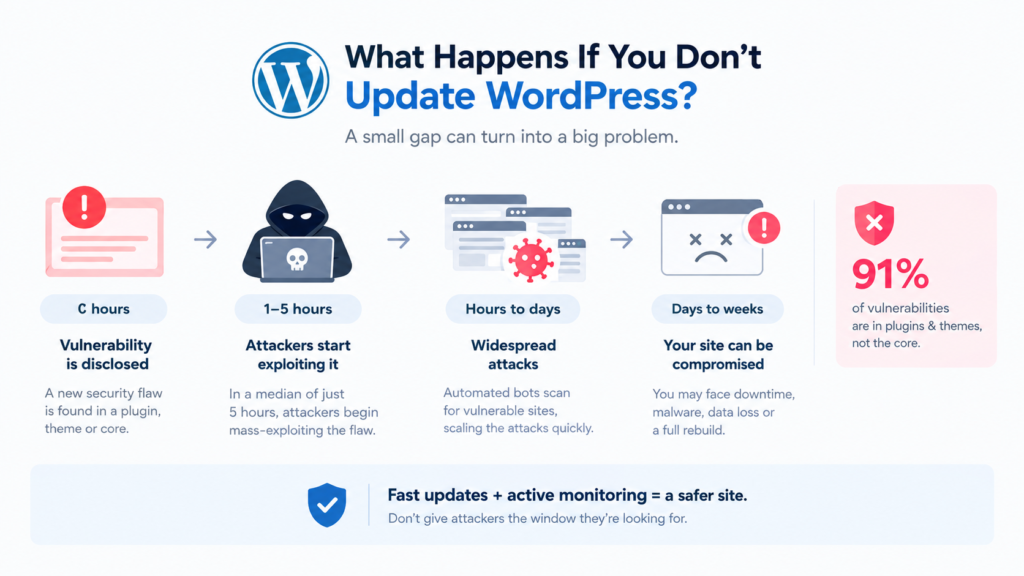
Short answer: your site becomes an easy target. Here is the data behind
that.
- 11,334 new vulnerabilities were discovered across the WordPress ecosystem in 2025, a 42% jump from the year before
- 91% of those vulnerabilities were found in plugins and themes, not WordPress core
- Attackers begin mass-exploiting a newly disclosed vulnerability in a median of just 5 hours
- Roughly 46% of vulnerabilities had no official patch available the moment they went public
That last point matters most. Even businesses that update promptly can get caught in the gap between disclosure and a fix. Fast updates, paired with active monitoring, are what actually close that window.
The WordPress Maintenance Checklist Every Small Business Needs
A solid WordPress maintenance checklist covers five areas. Skipping any one of them creates a weak point somewhere else.
1. Core, theme, and plugin updates, ideally tested on staging before going live
2. Automated daily or weekly backups, stored off-site
3. Security monitoring and malware scanning
4. Uptime monitoring with instant alerts
5. Speed optimization, including caching, image compression, and database cleanup
WordPress Security Updates
Security updates patch known vulnerabilities before attackers can exploit them. Given how fast exploits move once disclosed, delaying even a few days raises real risk. Auto-updates work fine for minor releases, but major updates deserve a quick staging test first.
WordPress Backups
WordPress backups are your safety net. If an update breaks something, or a plugin vulnerability gets exploited, a recent backup means restoring the site in minutes instead of rebuilding from scratch. Keep backups off the same server as the live site, since a compromised server can take local backups down with it
WordPress Maintenance Cost: What to Budget in 2026
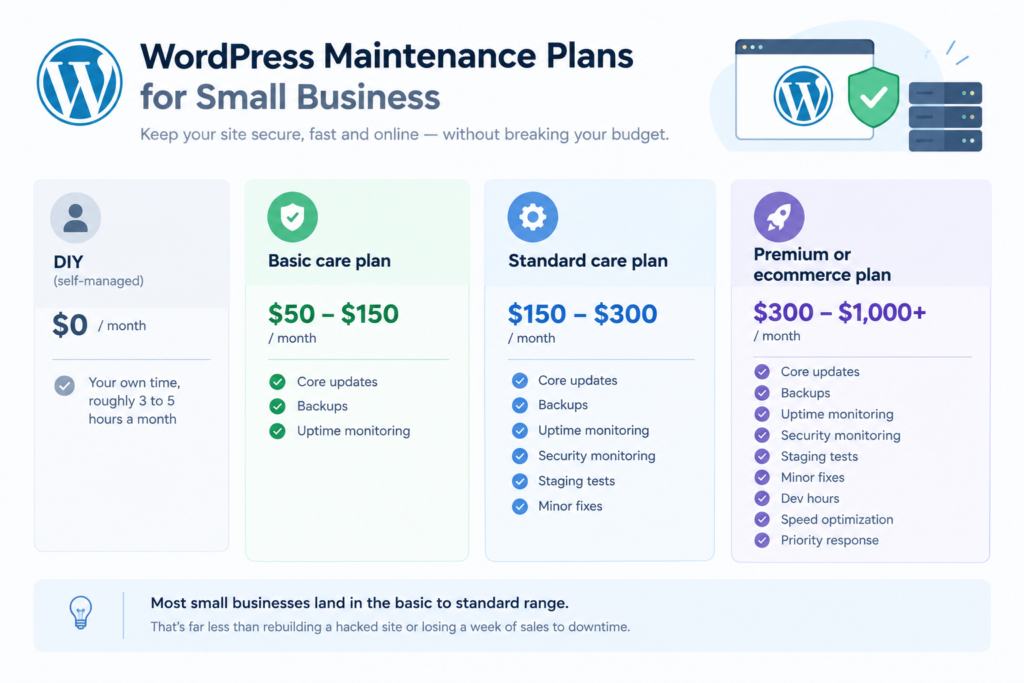
WordPress maintenance cost depends heavily on site complexity, plugin count, and whether you run ecommerce.
| Plan Tier | Monthly Cost | What's Included |
|---|---|---|
| DIY (self- managed) | $0 | Your own time, roughly 3 to 5 hours a month |
| Basic care plan | $50 to $150 | Core updates, backups, uptime monitoring |
| Standard care plan | $150 to $300 | Above, plus security monitoring, staging tests, minor fixes |
| Premium or ecommerce plan | $300 to $1,000+ | Above, plus dev hours, speed optimization, priority response |
Most small businesses land comfortably in the basic to standard range. That still costs far less than rebuilding a hacked site or losing a week of sales to downtime
DIY Maintenance vs WordPress Maintenance Services
DIY maintenance works if you have the time, some technical comfort, and a simple site. It costs nothing upfront, but those hours add up fast once something actually breaks.
WordPress maintenance services make more sense when:
- Your site generates leads or sales you cannot afford to lose
- You do not have in-house technical staff
- You have been hacked before, or you update irregularly
- You want speed optimization and monitoring, not just occasional updates
A WordPress care plan essentially buys back your time and removes the guesswork. Someone else watches for problems before they turn into expensive ones.
Frequently Asked Questions
WordPress maintenance is the ongoing work of updating WordPress core, plugins, and themes, monitoring security, running backups, and optimizing site speed to keep a website safe and performing well.
Start with checkout friction and page speed. EnablinHow much does WordPress maintenance cost for a small
business?g guest checkout, showing shipping costs early, and compressing product images usually deliver the fastest, most measurable gains.
Hosting typically covers server uptime, not plugin or theme updates on your specific site. Without dedicated maintenance,
vulnerable plugins can sit unpatched for months even on well-hosted sites.
Skipping updates
leaves known, publicly disclosed vulnerabilities open on your site. Automated attacks scan for outdated plugins constantly, and exploitation often begins within hours of a vulnerability going public.
If
your site generates revenue, stores customer data, or you cannot remember the last time anyone checked for updates, it is time for a maintenance plan or a dedicated WordPress care service.
Conclusion
WordPress maintenance is not glamorous work, but skipping it is one of the more expensive mistakes a small business can make online. Regular updates, backups, and monitoring cost far less than recovering
from a hacked or broken site. If it has been a while since anyone checked your plugins, backups, or site speed, now is a good time to find out where you stand. Reach out to getwebix for a free WordPress health check and a maintenance plan built around your actual site, not a generic package