


The Website Redesign Process: A Step-by-Step Guide
Key Takeaways
- 94 percent of first impressions about a business are based on design, according to research cited by HubSpot.
- 80.8 percent of businesses redesign their site specifically because of low conversion rates, not just an outdated look.
- A well-executed redesign typically delivers a 15 to 25 percent lift in conversion rate within six months.
- Small business redesigns (5 to 15 pages) usually take 4 to 8 weeks and cost $2,000 to $10,000.
- Skipping the audit and strategy phase is the single biggest reason redesigns fail to improve results.
In one sentence: the website redesign process is a structured sequence of auditing, planning, designing, building, and testing a site so the new version performs better, not just looks better, than the one it replaces.
The Website Redesign Process: Why Structure Beats a Fresh Coat of Paint
I’ve seen businesses spend thousands on a beautiful new site that performed exactly like the old one, sometimes worse. The design changed. The problems underneath never got diagnosed.
The website redesign process only works when it starts with data, not a mood board. Jumping straight to new colors and layouts feels productive, but it skips the step that actually moves the needle: understanding why your current site isn’t performing. This guide walks through the seven steps that separate a redesign that pays for itself from one that just looks different.
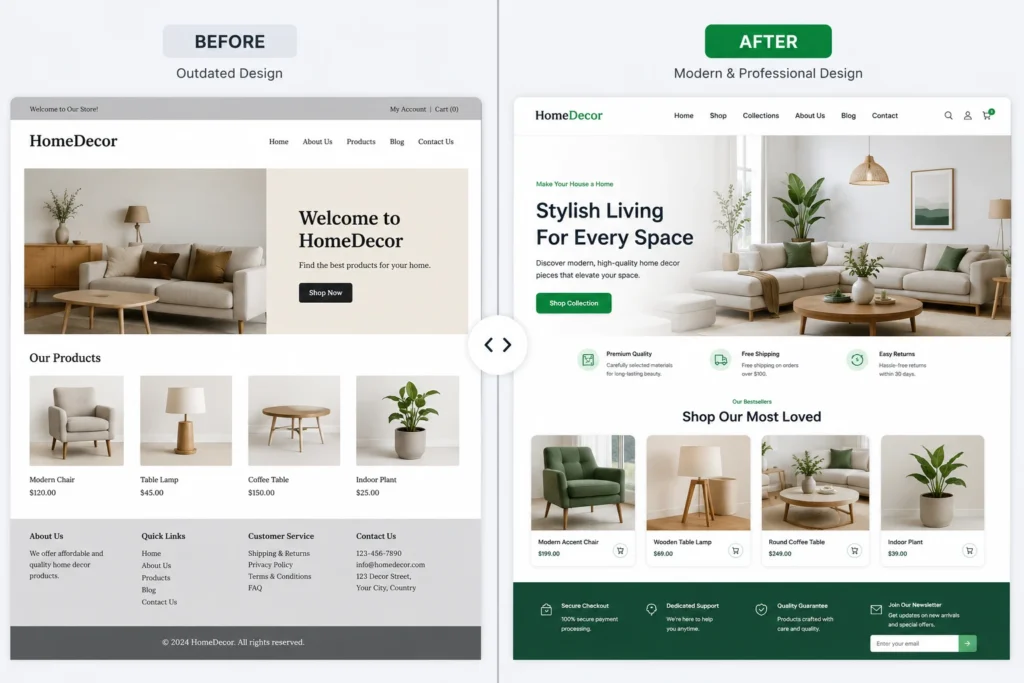
Why the Website Redesign Process Matters More Than a Fresh Look
Design isn’t decoration, it’s a trust signal. Research cited by HubSpot found that 94 percent of first impressions about a business are based on design alone, before a visitor reads a single word of copy.
That first impression carries real financial weight. A Forrester Research study found that a well-designed, seamless user experience can lift conversion rates by up to 400 percent compared to a poorly structured one. Most businesses undertaking a redesign already sense something is broken. Data from Sagapixel shows that 80.8 percent of businesses redesign specifically because of low conversion rates, not because they’re bored with the old design.
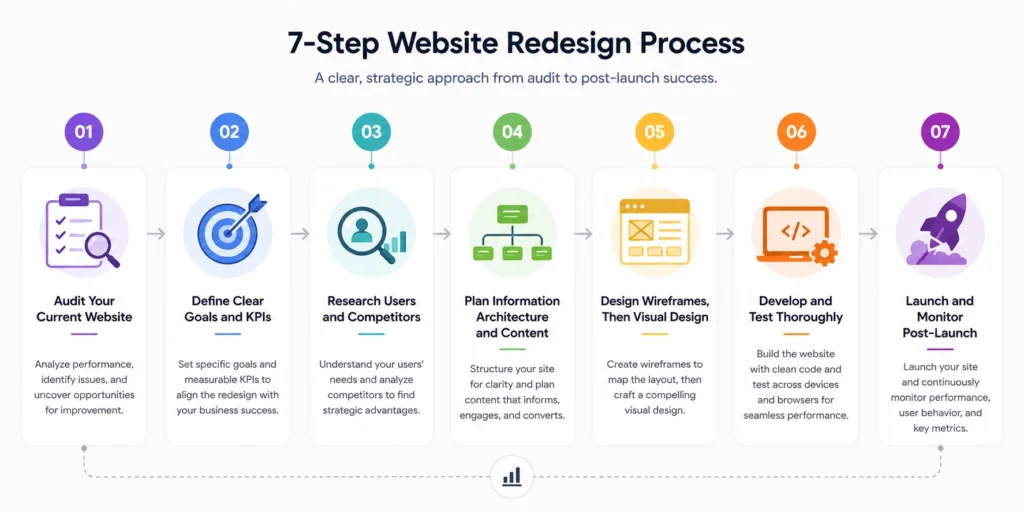
Website Redesign Steps: The Complete 7-Step Process
Following these steps in order keeps a redesign focused on outcomes instead of aesthetics alone.
Step 1: Audit Your Current Website
Start by reviewing analytics data, bounce rates, top landing pages, and conversion paths. Pair that with a technical SEO audit and a Core Web Vitals check using a tool like PageSpeed Insights. This audit tells you exactly what’s broken before you touch a single design element.
Step 2: Define Clear Goals and KPIs
Decide what success actually looks like. That might mean a lower bounce rate, more form submissions, or faster page load times. Document specific, measurable targets now, since they’ll guide every decision through the rest of the project.
Step 3: Research Users and Competitors
Look at how real visitors move through your site using heatmaps or session recordings. Review three to five competitor sites to spot gaps and opportunities. This step keeps the redesign grounded in actual user behavior, not assumptions.
Step 4: Plan Information Architecture and Content
Map out your site structure, navigation, and content before any visual design begins. Assign each page a primary keyword and a clear conversion goal. Skipping this step is why so many redesigns end up as a reshuffled version of the same confusing site. content strategy planning guide
Step 5: Design Wireframes, Then Visual Design
Build low-fidelity wireframes first to validate layout and content hierarchy without getting distracted by color choices. Once the structure is approved, move into full visual design using a consistent system of typography, color, and components.
Step 6: Develop and Test Thoroughly
Build the site on your chosen platform, then test across devices, browsers, and page speeds before launch. Set up 301 redirects for every existing URL to preserve search rankings during the transition. This step is where most quality issues get caught, if it’s not rushed.
Step 7: Launch and Monitor Post-Launch
Going live isn’t the finish line. Monitor analytics, heatmaps, and site speed closely for the first 30 to 90 days, then apply adjustments based on real usage data rather than guesswork.
How Long Does the Redesign Website Process Take?
Timeline depends almost entirely on scope and how ready your content is before the project starts. Here’s a realistic breakdown by business size.
| Site Size | Typical Timeline | Typical Cost | Key Focus |
|---|---|---|---|
| Small business (5 to 15 pages) | 4 to 8 weeks | $2,000 to $10,000 | Design, mobile optimization, basic SEO |
| Mid-size business (20 to 75 pages) | 8 to 16 weeks | $8,000 to $30,000 | UX research, custom integrations, content strategy |
| Enterprise or e-commerce | 3 to 6 months | $50,000 and up | Complex architecture, compliance, migration |
Projects slip when content isn’t ready or stakeholder feedback drags on. Locking your content and getting sign-off early keeps a redesign on schedule. website redesign cost calculator
Signs You Need a Full Redesign, Not Just a Refresh
Not every site needs to be rebuilt from scratch. These signals point toward a complete redesign rather than a smaller update:
- Bounce rates above 60 percent across your key landing pages
- Declining organic traffic despite steady or growing content output
- A brand identity that has changed since the site was last updated
- Mobile experience that feels broken or noticeably slower than desktop
- A content management system that’s outdated, unsupported, or hard to update
If only one or two of these apply, a targeted refresh may deliver better ROI than a full rebuild. If most of them apply, a structured redesign is worth the investment.
Common Mistakes in the Website Redesign Process
A handful of mistakes show up repeatedly in redesigns that don’t deliver results.
- Skipping the audit and jumping straight to new visuals
- Redesigning without clear KPIs, making it impossible to measure success afterward
- Ignoring mobile performance, even though the majority of traffic now comes from phones
- Forgetting SEO redirects, which can tank search rankings overnight
- Treating launch as the finish line instead of monitoring and adjusting afterward
Avoiding these mistakes matters more than picking a trendy visual style. A well-structured process consistently outperforms a rushed one, even with a smaller budget.
Frequently Asked Questions
What is the website redesign process?
The website redesign process is a structured sequence of auditing the current site, defining goals, researching users, planning content and structure, designing, developing, and monitoring results after launch, rather than simply updating the visual style.
How to know when a website redesign is necessary?
Look for bounce rates above 60 percent, declining organic traffic, a brand that no longer matches the site’s look, or a content management system that’s outdated and hard to maintain. Two or more of these signals usually justify a full redesign.
Why does skipping the audit phase hurt redesign results?
Without an audit, a redesign only changes appearance, not the underlying issues causing poor performance. Most conversion and traffic problems come from structural or technical issues that a visual refresh alone won’t fix.
How to preserve SEO rankings during a website redesign?
Set up 301 redirects for every existing URL, keep your core page content and keyword targeting intact, and submit an updated sitemap to search engines immediately after launch to speed up re-indexing.
What results should a business expect from a website redesign?
A well-executed redesign typically delivers a 15 to 25 percent lift in conversion rate within six months, along with improved page speed and lower bounce rates, though results depend heavily on the starting point and project scope.
The website redesign process works when it’s treated as a strategic project, not a visual refresh. Audit first, define clear goals, and build in testing and monitoring from the start, and the new site will outperform the old one on the metrics that actually matter.
Ready to start your redesign with a process built around real data instead of guesswork? And get a clear roadmap before any design work begins.
Related Posts
Local SEO for Service Businesses: Full Guide
Local SEO for Service Businesses: Full Guide Key Takeaways 46% of all Google searches carry local intent, and...
Read More
webshop
October 23, 2026
SSL Certificate and HTTPS: Why They Matter
SSL Certificate and HTTPS: Why They Matter Key Takeaways Starting with Chrome 154 in October 2026, Chrome will...
Read More
webshop
October 21, 2026
Shopify Migration: From WooCommerce or BigCommerce
Shopify Migration: From WooCommerce or BigCommerce Key Takeaways Most WooCommerce stores accumulate 20 to 60 active plugins by the...
Read More
webshop
October 19, 2026