

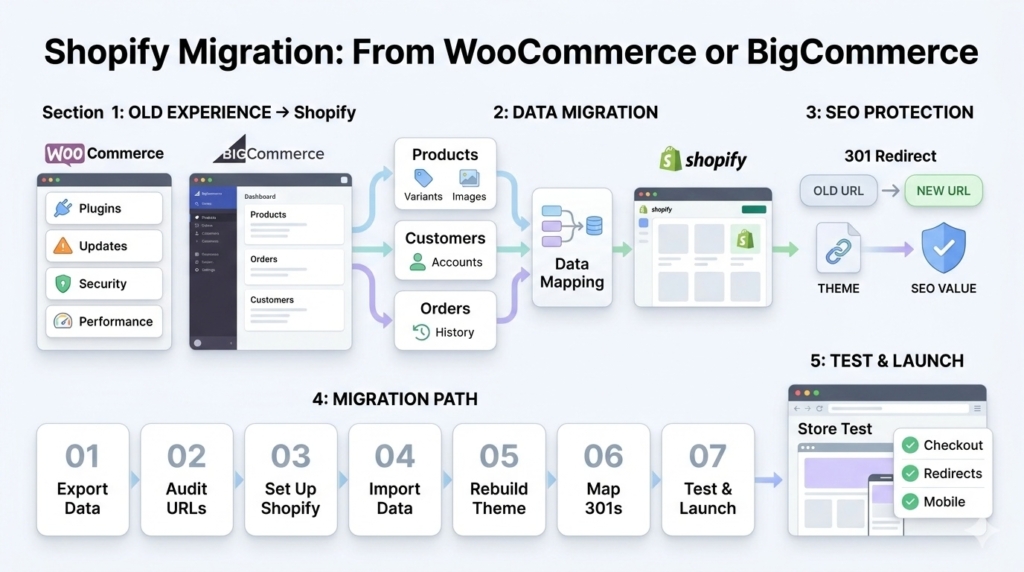
Shopify Migration: From WooCommerce or BigCommerce
Key Takeaways
- Most WooCommerce stores accumulate 20 to 60 active plugins by the time an owner considers migrating, each one adding maintenance overhead and security risk.
- 301 redirects are the single factor most likely to make or break SEO during a Shopify migration, more than any other technical step.
- Shopify migration cost for a small to mid-sized store typically ranges from under $2,000 for a simple app-based move to $15,000 or more for a fully custom rebuild.
- A well-executed migration can retain organic traffic from the first week post-launch, but only with a complete, tested redirect map in place before launch.
- Migrating products, customers, and order history all need distinct data mapping strategies, not a single generic export and import.
Shopify Migration: From WooCommerce or BigCommerce
By the time most store owners seriously consider a Shopify migration, their WooCommerce install has quietly accumulated 20 to 60 active plugins just to keep functioning. Each one needs updates. Each update risks breaking something else. We have handled migrations where the biggest risk was never the platform switch itself, it was losing search rankings because redirects were an afterthought instead of step one. Done right, a migration protects both. This guide covers exactly how to move from WooCommerce or BigCommerce to Shopify, what it costs, and how to keep your SEO intact through the switch. In one sentence: a Shopify migration means moving your products, customers, orders, and SEO value from WooCommerce or BigCommerce to Shopify’s platform, and the outcome depends almost entirely on how carefully data mapping and redirects are handled before
launch.
WooCommerce vs Shopify and BigCommerce vs Shopify: Why Merchants Switch
WooCommerce vs Shopify usually comes down to maintenance burden. WooCommerce is technically free, but hosting, plugin licenses, security patches, and performance tuning add real, ongoing cost and time that a fully managed platform removes.
BigCommerce vs Shopify is a closer comparison, since both are hosted SaaS platforms. The difference tends to show up in app ecosystem size and ease of theme customization, where Shopify’s larger developer community and app marketplace usually wins out for most small to midsized stores.
| Factor | WooCommerce | BigCommerce | Shopify |
|---|---|---|---|
| Hosting | Self-managed | Included | Included |
| Ongoing maintenance | High (plugins, security) | Low | Low |
| App ecosystem | WordPress plugins | Moderate | Largest |
| Theme customization | Full code access | Moderate | Liquid-based, flexible |
How to Migrate to Shopify: The Core Process
Learning how to migrate to Shopify from either platform follows roughly the same core sequence, regardless of source.
- Export a full inventory of products, customers, and order history from your current platform
- Audit every URL on your current site and document its structure
- Set up your new Shopify store and configure core settings before importing data
- Import products, customers, and orders using Shopify’s tools or a migration app
- Rebuild your theme in Liquid, Shopify’s templating language, since old templates do not transfer directly
- Map and upload 301 redirects for every changed URL before going live
- Test the entire store on a staging URL before pointing your domain at it
An ecommerce platform migration handled in this order minimizes the chance of losing data or search visibility along the way
Migrating Products and Customers to Shopify
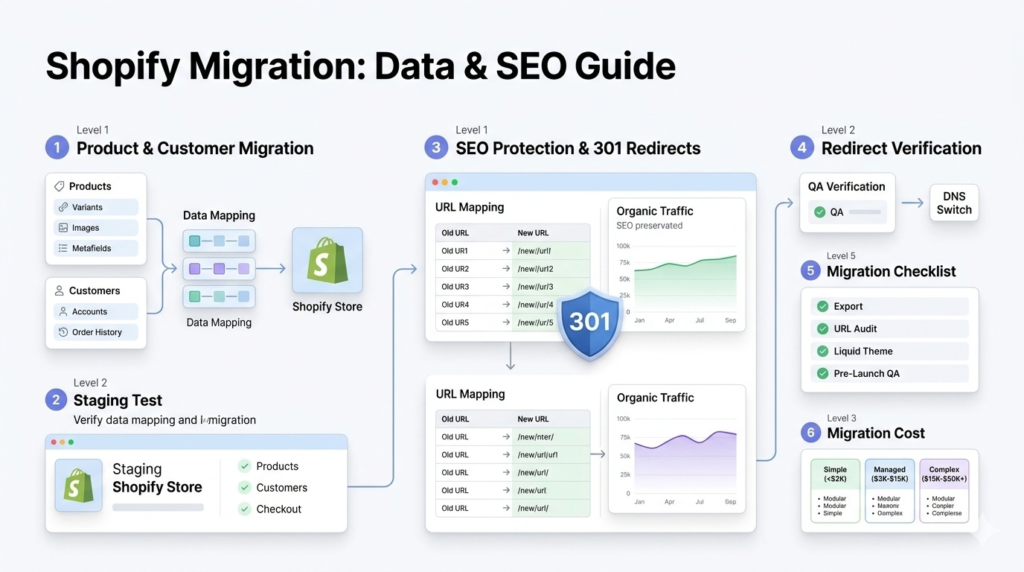
Migrating products and customers to Shopify is rarely a clean, one-click export and import, especially for stores with variants, custom fields, or complex pricing rules. Product migration needs careful attention to variants, images, and metafields, since these often do not map directly between platforms. Customer migration needs the same care for order history and any loyalty or subscription data tied to individual accounts. Run a full test migration into a staging Shopify store first. Catching mapping errors there costs nothing. Catching them after launch costs customer trust.
Shopify Migration SEO: Protecting Your Rankings
Shopify migration SEO is where most preventable revenue loss happens. Search engines do not automatically know your new Shopify URLs represent the same pages as your old site.
301 Redirects After Shopify Migration
301 redirects after Shopify migration are the single most important technical step in the entire process. Every changed URL needs a
corresponding redirect, mapped and verified before the domain switch, not added afterward once rankings have already dropped.
Build your redirect map directly from your pre-migration URL audit. Upload it through Shopify’s bulk redirect tool, then verify each redirect resolves correctly before touching your DNS settings. Stores that treat this step seriously can retain organic traffic from the first week after launch. Stores that treat it as an afterthought often see rankings drop for weeks or months while search engines slowly recrawl and reindex.
Shopify Migration Checklist
Use this Shopify migration checklist as your pre-launch reference.
- Full product, customer, and order export completed and verified
- Complete URL audit with a 301 redirect mapped for every changed page
- Theme rebuilt in Liquid, not just visually copied from the old site
- Staging store fully tested, including checkout and payment processing
- Analytics and conversion tracking configured before launch, not after
- Redirects verified live before DNS is pointed at the new store Shopify Migration Cost: What to Expect
Shopify migration cost varies significantly based on catalog size, customization needs, and whether you are moving from WooCommerce or BigCommerce.
| Migration Scope | Typical Cost | Best For |
|---|---|---|
| App-based, simple catalog | Under $2,000 | Small catalogs, minimal customization |
| Managed migration with theme rebuild | $3,000 to $15,000 | Most small to mid-sized businesses |
| Complex migration, custom integrations | $15,000 to $50,000+ | Large catalogs, B2B pricing, heavy customization |
Enterprise-tier Shopify Plus migrations can run considerably higher, but
most small business moves fall comfortably within the ranges above
Frequently Asked Questions
What is involved in a Shopify migration?
A Shopify migration involves
exporting products, customers, and order history from your current
platform, rebuilding your theme in Shopify’s Liquid language, and
mapping 301 redirects for every URL before launch.
How do I migrate to Shopify without losing SEO?
Audit every
existing URL, build a complete 301 redirect map before launch, and
verify each redirect resolves correctly before pointing your domain at the
new Shopify store.
Why is BigCommerce to Shopify migration easier than WooCommerce to Shopify?
BigCommerce’s data structures map more
directly to Shopify’s, and most apps have direct equivalents.
WooCommerce migrations require rebuilding functionality from dozens
of accumulated plugins individually
How much does a Shopify migration cost for a small business?How much does a Shopify migration cost for a small business?
Most small to mid-sized businesses spend between $3,000 and $15,000
for a professionally managed migration with a theme rebuild, though
simple app-based migrations can cost under $2,000.
What Shopify store migration services should I look for?
Look for
providers who handle data mapping, theme rebuilding, and 301 redirect
planning as a complete package, not just a raw data export and import.
Conclusion
Shopify migration from WooCommerce or BigCommerce is as much an SEO project as it is a technical one. The platforms you compare matter less than how carefully the switch itself gets executed. Get the redirect map and data mapping right, and the migration becomes a genuine upgrade instead of a risk. Reach out to getwebix for Shopify migration handled with SEO protection built in from day one.
Related Posts

How to Choose the Right E-commerce Platform
How to Choose the Right E-commerce Platform Key Takeaways WooCommerce powers the most stores by raw count, roughly...
Read More
webshop
August 3, 2026