

E-commerce Payment Gateway Integration Guide
Key Takeaways
- Nearly 70 percent of online shopping carts get abandoned before checkout, and a clunky payment flow is a leading cause.
- Stripe charges 2.9% plus $0.30 per transaction, PayPal runs closer to 3.49% plus $0.49, and Square charges 2.6% plus $0.10 for in-person sales.
- Offering PayPal alongside a card gateway can lift checkout conversion by roughly 28 to 34 percent, based on PayPal’s own reported data.
- Every gateway on the market today handles PCI compliance for you, but your checkout page still needs to follow basic security practices.
- Most small businesses can complete a hosted integration in hours, while a fully custom checkout takes real developer time.
In one sentence: e-commerce payment gateway integration means connecting a secure payment processor like Stripe, PayPal, or Square to your online store so customers can pay by card or digital wallet without leaving your checkout flow.
E-commerce Payment Gateway Integration: Why Getting It Right Matters
I’ve watched small stores lose sales at the exact moment a customer was ready to buy, simply because checkout asked for too much or loaded too slowly. That single friction point costs more revenue than most owners realize.
E-commerce payment gateway integration is the process of connecting your store to a service that securely processes credit cards, digital wallets, and bank transfers. Get it right, and checkout feels invisible to your customer. Get it wrong, and you watch carts get abandoned right before the sale closes. This guide walks through how integration works, what it costs, and how to avoid the mistakes that quietly drain revenue.
What Is E-commerce Payment Gateway Integration?
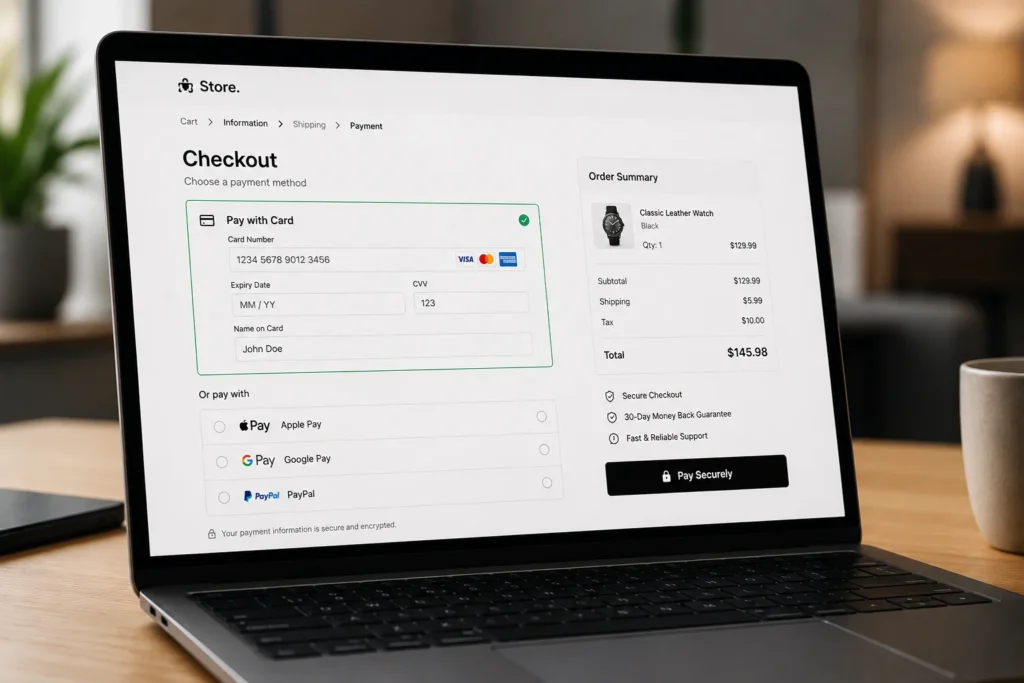
A payment gateway is the technology layer that sits between your checkout page and the banks involved in a transaction. It verifies the customer has funds, requests authorization, and passes the approved payment back to your store in seconds.
Integration is simply connecting that gateway to your website or app. Depending on the method you choose, this can mean adding a few lines of code, installing a plugin, or building a fully custom API connection. The right choice depends on your technical resources and how much control you want over the checkout experience.
Payment Gateway Integration Guide: The Three Integration Methods
Not every business needs the same setup. Here are the three main approaches, from simplest to most flexible.
- Hosted checkout. The customer is redirected to the gateway’s own payment page to complete the purchase, then returns to your site. This is the fastest to set up and requires little to no coding.
- Embedded or iframe checkout. The payment form loads directly on your page but is still processed by the gateway’s secure servers. This keeps your branding consistent while limiting your PCI compliance burden.
- Full API integration. Developers build a fully custom checkout using the gateway’s API, giving complete control over design and flow. This method takes the most time and technical skill.
Most small businesses start with a hosted or embedded checkout and move to a custom API integration only once volume or specific features justify the extra development cost. [LINK: Shopify development services]
How to Integrate a Payment Gateway: Step by Step
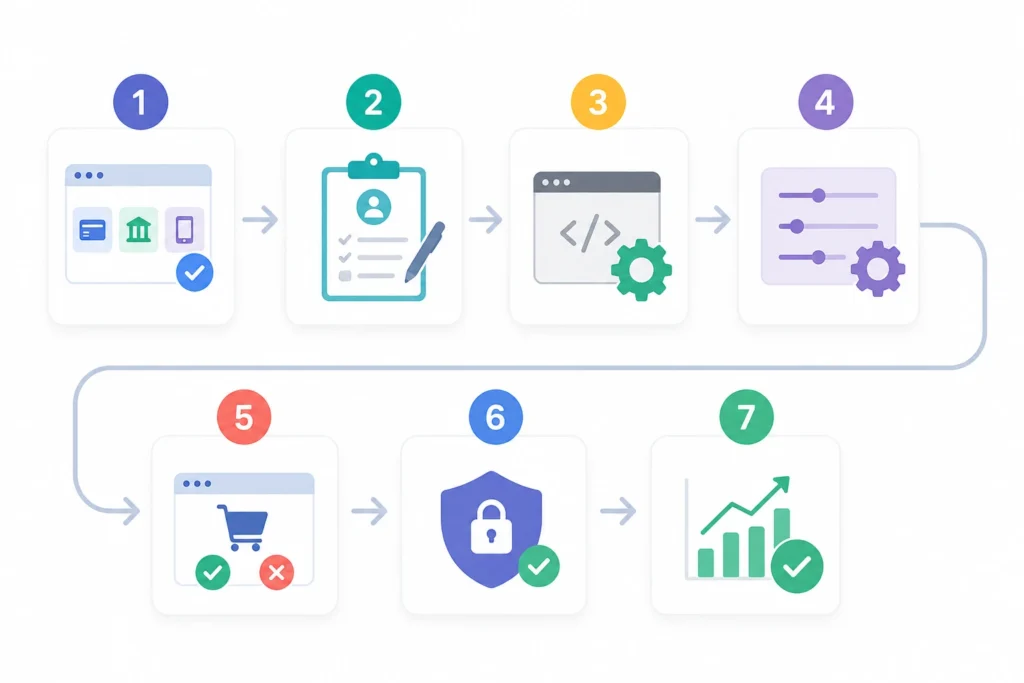
Once you’ve chosen a method, the actual setup follows a fairly consistent process across providers.
- Choose your gateway based on fees, supported payment methods, and your sales channel (online, in-person, or both).
- Create a merchant account with the provider, which usually requires basic business and banking information.
- Generate API keys or install the official plugin for your platform, such as Shopify, WooCommerce, or a custom site.
- Configure your checkout page, including accepted currencies, payment methods, and receipt settings.
- Test transactions in sandbox mode before going live, covering successful payments, declines, and refunds.
- Enable fraud tools, such as 3D Secure authentication or the gateway’s built-in risk scoring.
- Go live and monitor your first real transactions closely for the first week.
Skipping the testing step is the most common cause of launch-day payment failures. Always run a real sandbox transaction before flipping the switch on a live store.
Comparing Popular E-commerce Payment Processing Options
Fees and features vary enough between providers that the “best” choice depends entirely on your business model.
| Gateway | Online Transaction Fee | Best For | Setup Complexity |
|---|---|---|---|
| Stripe | 2.9% + $0.30 | Developer-friendly custom checkouts | Moderate to high |
| PayPal | 3.49% + $0.49 | Consumer trust, faster checkout adoption | Low |
| Square | 2.6% + $0.10 (in-person) | Retail and service businesses with POS needs | Low |
| Authorize.Net | Varies by plan, plus monthly fee | Businesses needing a dedicated merchant account | Moderate |
Stripe’s flat-rate pricing works well for most stores under $10,000 a month in volume. Once sales grow past that point, interchange-plus pricing models from other providers can lower your effective rate, so it’s worth revisiting your setup annually. e-commerce payment processing cost comparison
E-commerce Payment Processing Security and PCI Compliance
Security isn’t optional, and customers notice when it feels missing. Every reputable gateway today is PCI DSS compliant, meaning it meets the card industry’s data security standards.
That said, your responsibility doesn’t disappear entirely. Here’s what still falls on your store:
- Using HTTPS across your entire checkout flow, not just the payment page
- Never storing raw card numbers on your own servers
- Enabling 3D Secure or equivalent fraud checks for higher-risk transactions
- Keeping your platform, plugins, and themes updated to patch security gaps
Nearly 70 percent of online shopping carts are abandoned before checkout, and weak security signals are one of the recurring reasons customers cited for stopping. A visible security badge and a fast, simple checkout do more for conversion than most owners expect.
Common Payment Gateway Integration Mistakes to Avoid
A few recurring issues show up again and again in small business integrations:
- Skipping sandbox testing and discovering payment failures on launch day
- Offering only one payment method, which excludes customers who prefer PayPal or digital wallets
- Ignoring mobile checkout speed, even though most e-commerce traffic now comes from phones
- Underestimating chargeback fees, which typically run $15 to $25 per dispute regardless of outcome
- Choosing a gateway based on the lowest headline rate alone, without checking monthly fees or volume caps
Reviewing your payment setup once a year, not just at launch, catches most of these before they cost real revenue.
Frequently Asked Questions
What is e-commerce payment gateway integration?
E-commerce payment gateway integration is the process of connecting a payment processor like Stripe, PayPal, or Square to your online store so it can securely accept and process customer payments.
How to choose the right payment gateway for a small business?
Compare transaction fees against your typical sale size, check which payment methods your customers prefer, and confirm the gateway integrates with your existing e-commerce platform before committing.
Why does payment gateway integration affect checkout conversion rates?
A slow, confusing, or limited checkout drives customers away before they complete a purchase. Fast, familiar payment options like PayPal or Apple Pay reduce that friction and directly improve conversion.
How to test a payment gateway integration before going live?
Use the gateway’s sandbox or test mode to run sample transactions covering successful payments, declined cards, and refunds. Confirm order confirmations and receipts generate correctly before switching to live mode.
What are the typical costs of e-commerce payment processing?
Most gateways charge 2.6% to 3.5% per transaction plus a small fixed fee, though exact rates depend on the provider, your sales volume, and whether the sale happens online or in person.
E-commerce payment gateway integration is not just a technical checkbox. It’s one of the biggest levers you have over checkout conversion and customer trust. Choose a provider that fits your volume, test thoroughly before launch, and revisit your setup as your business grows.
Need help getting your payment gateway integration right the first time? and get a setup built around how your customers actually pay.
Related Posts

How to Choose the Right E-commerce Platform
How to Choose the Right E-commerce Platform Key Takeaways WooCommerce powers the most stores by raw count, roughly...
Read More
webshop
August 3, 2026