


Gutenberg vs Page Builders: Which Is Best?
Key Takeaways
Elementor remains the most-installed WordPress page builder at over 10 million active installs, though its share of the page builder market has declined from 56% in 2023 to roughly 40 to 50% in 2026.
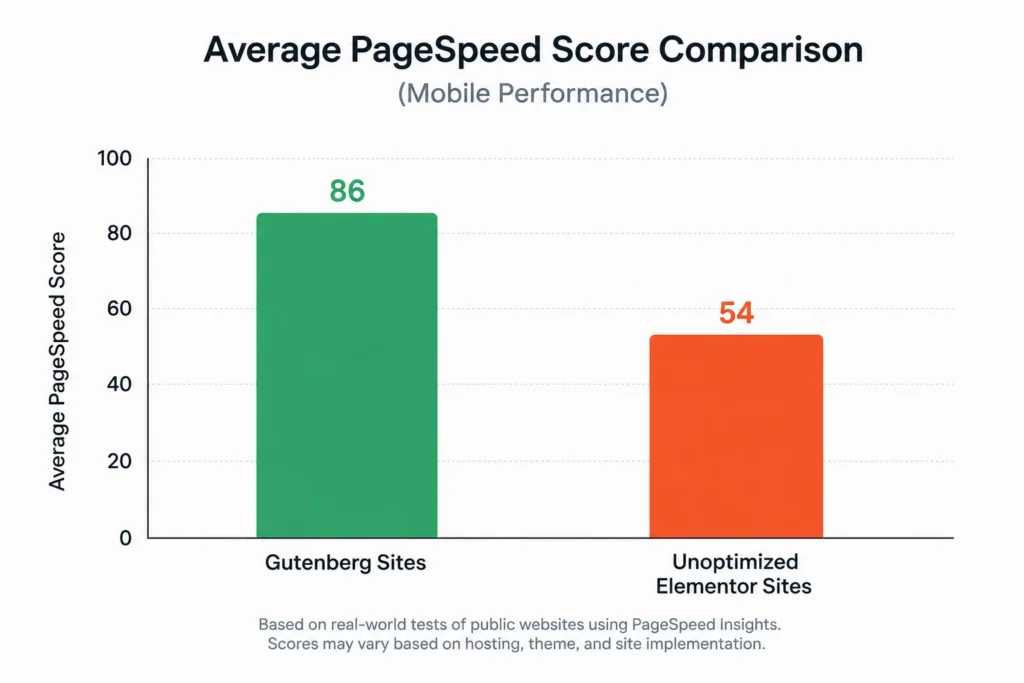
Native Gutenberg sites typically score meaningfully higher on out-of-box PageSpeed and Core Web Vitals than heavily customized page builder sites, though newer releases from both sides are narrowing that gap.
Gutenberg’s Full Site Editing adoption is reportedly growing around 145% year over year as WordPress core continues investing in it.
Market share figures for both tools vary significantly by tracking source, so treat any single precise percentage as directional, not definitive.
The right choice depends less on which tool is “better” and more on whether your team prioritizes raw performance or fast, flexible visual design.
In one sentence: in the Gutenberg vs page builders debate, Gutenberg wins on raw speed and long-term simplicity, while dedicated page builders like Elementor win on visual design flexibility and speed of building complex layouts.
Gutenberg vs Page Builders: Why This Debate Still Matters in 2026
I’ve rebuilt sites that were creaking under the weight of a page builder nobody on the team fully understood anymore, and I’ve also fought Gutenberg’s block editor trying to recreate a layout that a builder handles in two clicks. Neither tool is universally right. The debate persists because the trade-offs are real.
Gutenberg vs page builders isn’t a settled argument, even years after Gutenberg became WordPress’s default editor. Both paths have matured significantly, and the right pick depends on what your site actually needs to do, not which tool has better marketing. This guide breaks down the real differences in performance, flexibility, and cost, so you can choose with actual data instead of forum opinions.
Gutenberg vs Page Builders: What Each One Actually Is
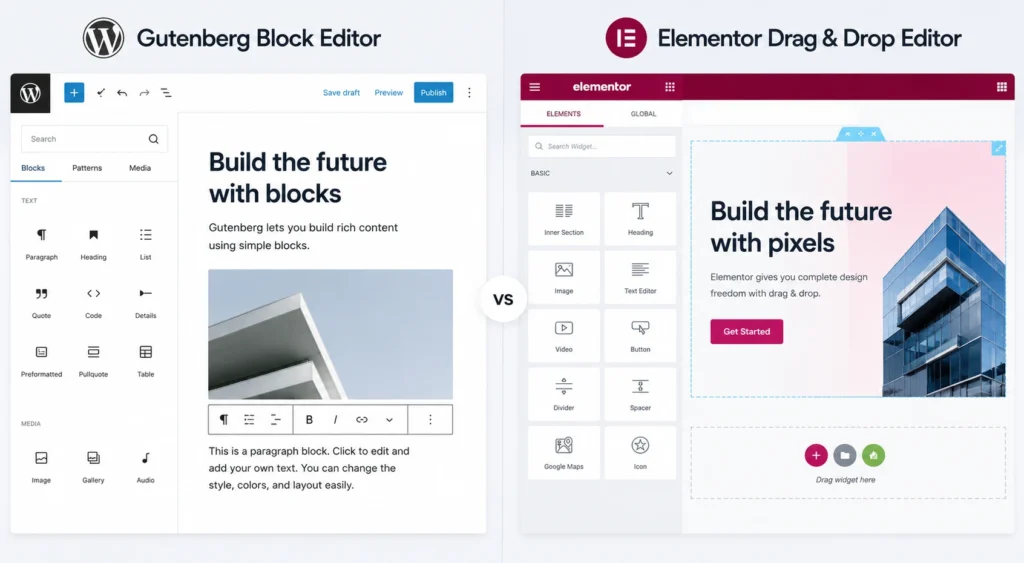
Gutenberg is WordPress’s native block editor, built directly into core since 2018 and expanded significantly with Full Site Editing, which lets you design headers, footers, and templates using the same block system as your content.
Page builders like Elementor, Divi, and Bricks are third-party plugins that add a visual, drag-and-drop layer on top of WordPress, typically with more design controls, prebuilt templates, and marketing-focused widgets than Gutenberg ships with by default.
The core distinction isn’t complicated. Gutenberg is built in and free. Page builders add capability at the cost of extra code running on every page load.
Block Editor vs Page Builder: The Core Trade-off
Every comparison in this space eventually comes down to the same tension: performance versus design flexibility.
Gutenberg produces cleaner, lighter output because it’s part of WordPress core and doesn’t need to load a separate plugin’s rendering engine on every page. That translates directly into faster load times and an easier path to passing Core Web Vitals without extra optimization work.
Page builders trade some of that lightness for design speed. Building a complex, multi-column marketing layout with custom animations is often faster in a visual builder than assembling the same result from Gutenberg’s native blocks, even with a good block plugin added on top. WordPress site performance audit
Gutenberg vs Elementor: Performance and Core Web Vitals
Elementor is the page builder most often compared directly against Gutenberg, since it remains the market leader among third-party builders. Here’s how they typically compare.
| Factor | Gutenberg | Elementor |
|---|---|---|
| Typical PageSpeed Score | Often in the low-to-mid 90s out of the box | Often in the high 60s to low 80s without optimization |
| Cost | Free, built into WordPress | Free tier available, Pro from roughly $59/year |
| Design Flexibility | Improving steadily with block plugins | Extensive, mature widget and template library |
| Learning Curve | Low for content, moderate for full custom layouts | Low for visual design, moderate for performance tuning |
| Vendor Lock-in | Minimal, content stored as portable blocks | Higher, layouts tied to Elementor's rendering |
Both tools have moved to close their weaknesses. Elementor’s newer releases include features specifically aimed at reducing the performance penalty that’s defined much of its 2020s reputation, while Gutenberg’s block ecosystem has grown enough to handle layouts that once required a dedicated builder. Market share estimates for both tools vary meaningfully depending on the tracking source, so treat any single precise percentage you see elsewhere as directional rather than exact. Elementor vs Gutenberg build consultation
WordPress Page Builder vs Gutenberg: Which Fits Your Business
Match the tool to what your team actually needs to build and maintain, not to whichever one is trending in developer forums.
- Content-focused sites, blogs, and service businesses with straightforward layouts usually do better on Gutenberg, since performance and simplicity matter more than complex visual design.
- Marketing-heavy sites with frequent landing page needs often benefit from a page builder’s speed of assembling new layouts without developer involvement.
- Teams without a developer on staff may find a page builder’s visual controls easier to manage long-term, even with the performance trade-off.
- Performance-critical sites, including anything competing hard on local or national SEO, should lean toward Gutenberg or a lightweight, performance-focused builder like Bricks.
There’s no wrong answer here as long as the choice matches your team’s actual constraints, not just which tool looks more impressive in a demo.
Common Mistakes When Choosing Between Gutenberg and Page Builders
A handful of recurring mistakes show up regardless of which tool a business ultimately picks.
- Running both a page builder and heavy Gutenberg customization on the same site, which compounds performance overhead instead of adding flexibility
- Choosing a page builder purely for its template library without accounting for the ongoing optimization work it will require
- Underestimating Gutenberg’s current capabilities, especially Full Site Editing, and assuming a page builder is still required for anything beyond basic blog posts
- Ignoring long-term maintenance, since a heavily customized page builder site often takes more effort to keep updated and fast over time
- Switching tools mid-project without a clear migration plan, which frequently breaks existing layouts
Picking one tool and committing to it, rather than mixing approaches inconsistently across a site, avoids most of the performance and maintenance headaches either path can create.
Frequently Asked Questions
What is the difference between Gutenberg and a page builder?
Gutenberg is WordPress’s native, built-in block editor, while a page builder is a third-party plugin that adds extra visual design tools and templates on top of WordPress, typically at some cost to page load performance.
How to decide between Gutenberg and Elementor for a small business site?
Choose Gutenberg if performance and simplicity matter most, especially for content-focused or SEO-competitive sites. Choose Elementor if your team needs to build complex, highly visual layouts quickly without developer involvement.
Why does Gutenberg typically outperform page builders on Core Web Vitals?
Gutenberg is part of WordPress core and doesn’t need to load a separate plugin’s rendering engine, resulting in lighter code and faster load times out of the box compared to most page builders, which add extra CSS and JavaScript.
How to improve performance on an Elementor or other page builder site?
Use a caching plugin, minimize the number of widgets and third-party addons active on each page, enable any built-in optimization features the builder offers, and test Core Web Vitals regularly rather than only checking scores after major layout changes.
What are the risks of switching from a page builder back to Gutenberg?
Switching typically requires manually rebuilding pages, since page builder layouts don’t convert cleanly into native blocks. Plan for a phased migration rather than attempting to switch an entire site at once.
Gutenberg vs page builders isn’t about finding one universal winner, it’s about matching the tool to your team’s actual priorities, whether that’s raw performance or fast, flexible visual design. Both paths are mature enough in 2026 to support a serious business website when used deliberately.
Ready to figure out which approach actually fits your WordPress site? and get a plan based on your specific performance and design needs, not a generic tool preference.
Related Posts

Local SEO for Service Businesses: Full Guide
Local SEO for Service Businesses: Full Guide Key Takeaways 46% of all Google searches carry local intent, and...
Read More
webshop
October 23, 2026

SSL Certificate and HTTPS: Why They Matter
SSL Certificate and HTTPS: Why They Matter Key Takeaways Starting with Chrome 154 in October 2026, Chrome will...
Read More
webshop
October 21, 2026

Shopify Migration: From WooCommerce or BigCommerce
Shopify Migration: From WooCommerce or BigCommerce Key Takeaways Most WooCommerce stores accumulate 20 to 60 active plugins by the...
Read More
webshop
October 19, 2026