


SSL Certificate and HTTPS: Why They Matter
Key Takeaways
- Starting with Chrome 154 in October 2026, Chrome will warn visitors before they load any public site that does not use HTTPS.
- HTTPS adoption has plateaued at 95% to 99% of Chrome traffic since 2020, up from just 30% to 45% in 2015.
- Google has used HTTPS as a ranking signal since 2014, and Chrome’s new default settings raise the stakes further.
- Free SSL certificates from Let’s Encrypt now cover most small business needs, with paid options starting around $8 a year for extra validation.
- An expired SSL certificate or a mixed content error can trigger the same “not secure” warning as never having one installed at all.
SSL Certificate and HTTPS: Why They Matter
Chrome is about to change how it treats sites without an SSL certificate. Starting with Chrome 154 in October 2026, the browser will warn visitors before loading any public site that still runs on plain HTTP. This is not a distant policy update. It has already started rolling out to more than a billion Chrome users on Enhanced Safe Browsing, and it reaches everyone else within weeks.
We have moved clients off old HTTP setups before, usually after a customer mentioned seeing a scary browser warning and nearly leaving the site. This guide explains what an SSL certificate actually does, why it matters right now, and how to get one installed properly. In one sentence: an SSL certificate encrypts the connection between your website and its visitors, switches your address from HTTP to HTTPS, and is now required to avoid active browser warnings that can scare visitors away before they see your content.
What Is an SSL Certificate?
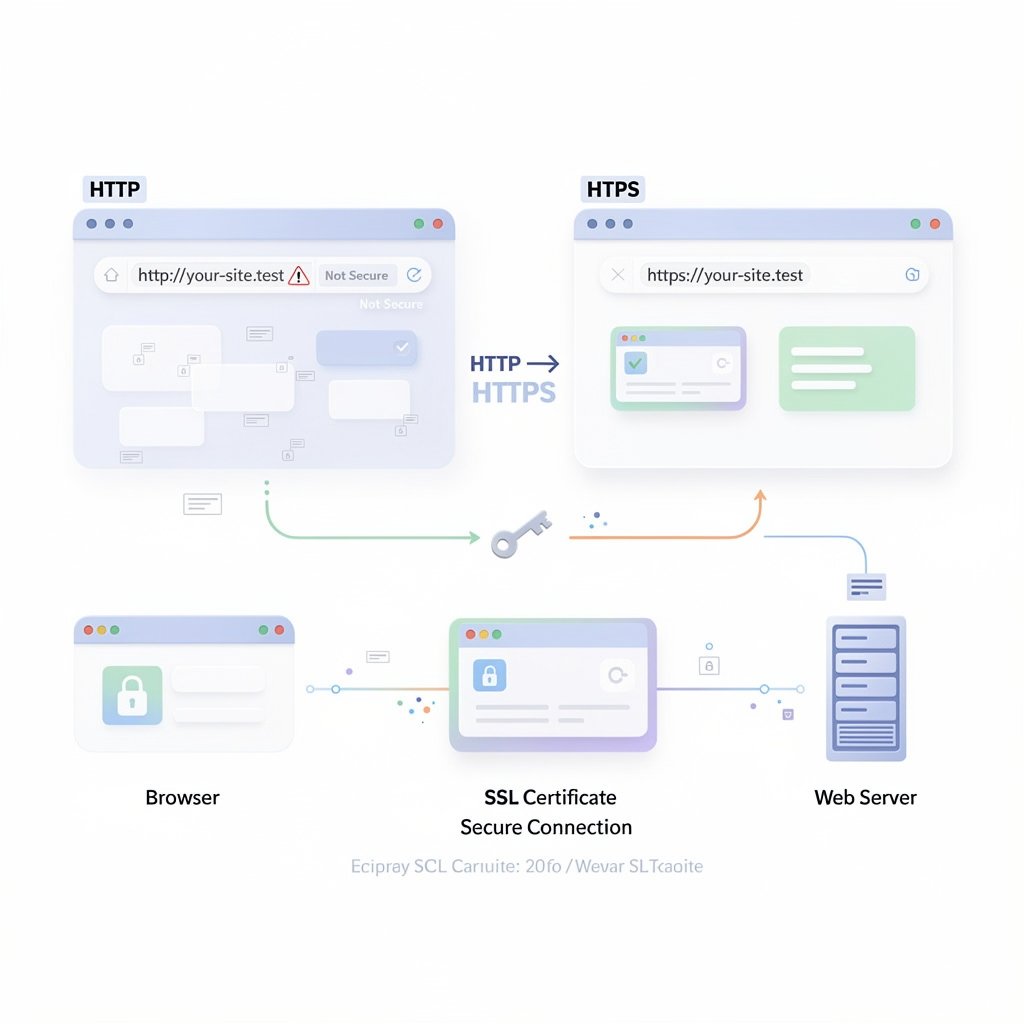
An SSL certificate is a small digital file installed on your web server. It does two jobs: it encrypts data moving between your site and its visitors, and it proves your domain is genuinely what it claims to be. How SSL certificates work comes down to a handshake between browser and server. When a visitor loads your site, the browser and erver exchange encryption keys, confirm the certificate is valid, and establish a secure connection before any content loads. Modern certificates technically use TLS, the successor to SSL, but the industry still calls them SSL certificates out of habit. Either way, the visible result is the same: your URL starts with https:// and a padlock appears in the address bar.
HTTPS vs HTTP: What Actually Changes
HTTPS vs HTTP comes down to one word: encryption. HTTP sends data in plain text, readable by anyone intercepting the connection. HTTPS encrypts it, making that data unreadable without the right key. For a site collecting any information at all, a contact form, a login, a checkout, that difference is not optional anymore. Even simple brochure sites benefit, since browsers now treat HTTP as inherently suspicious regardless of what the site actually does.
Why HTTPS Matters More Than Ever in 2026
Why HTTPS matters has changed meaningfully this year. HTTPS adoption plateaued at 95% to 99% of Chrome traffic back in 2020, up from just 30% to 45% in 2015. That remaining sliver of HTTP traffic is exactly what Chrome 154 is designed to close.
Once the rollout completes, visitors hitting an HTTP site for the first time will see a warning and have to actively confirm they want to proceed. Most visitors will not. A “not secure” warning in Chrome, whether from missing HTTPS entirely or from a certificate problem, is one of the fastest ways to lose a visitor before they read a single word of your content.
HTTPS and SEO: Is It Really a Ranking Factor?
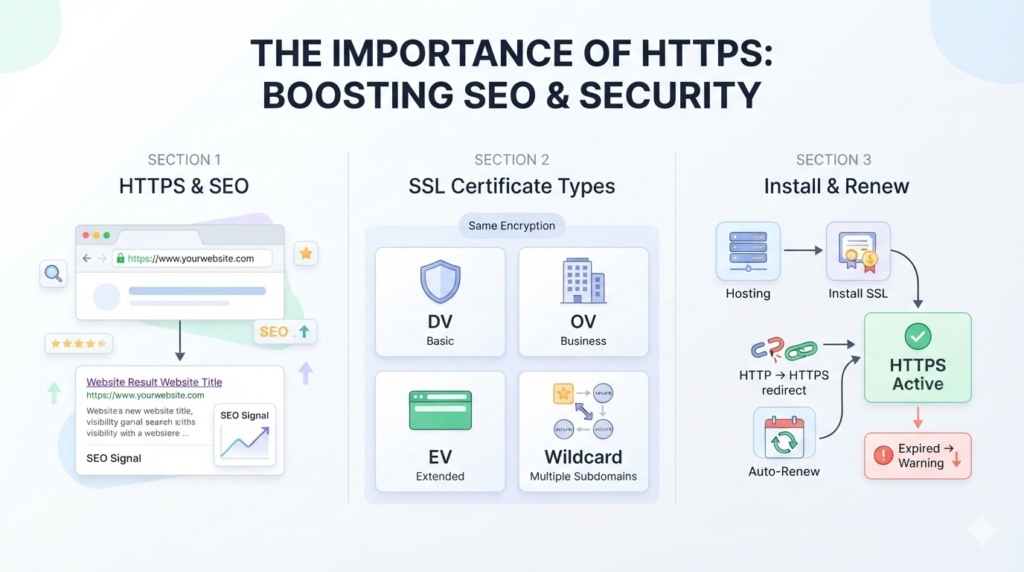
HTTPS and SEO ranking factor status is not new. Google confirmed HTTPS as a ranking signal back in 2014, though it has always been described as a lightweight one compared to content quality or backlinks. The bigger SEO risk in 2026 is indirect. A “not secure” warning increases bounce rate, and rising bounce rates alongside falling engagement are exactly the kind of behavioral signals that can drag down rankings over time, regardless of how HTTPS itself is weighted.
Types of SSL Certificates and What They Cost
SSL certificate cost depends entirely on validation level, not encryption strength. All certificate types encrypt data the same way.
| Certificate Type | Typical Annual Cost | Best For |
|---|---|---|
| Domain Validation (DV) | Free (Let's Encrypt) to $10 | Most small business and service sites |
| Organization Validation (OV) | $30 to $200 | Sites collecting sensitive customer data |
| Extended Validation (EV) | $75 to $400 | Banking, finance, or high-trust ecommerce |
| Wildcard | From $80 | Sites with multiple subdomains |
A free SSL certificate from Let’s Encrypt covers the actual encryption needs of most small business websites. The higher-tier options mostly dd verified business identity checks, which matter more for finance and large-scale ecommerce than a typical service business site.
How to Install an SSL Certificate and Keep It Renewed
Learning how to install an SSL certificate is usually simpler than it sounds, especially with a free option.
- Confirm whether your hosting provider offers free SSL through Let’s Encrypt, most do by default now
- If not, purchase a certificate matching your needs from a certificate authority
- Install it through your hosting control panel or have your developer configure it server-side
- Redirect all HTTP traffic to HTTPS so visitors never land on the insecure version
- Set a reminder for SSL certificate renewal, since most certificates expire every 90 days to a year
Let’s Encrypt certificates typically auto-renew if configured correctly, but paid certificates often require manual renewal. An expired certificate triggers the exact same warning as never having installed one.
Avoiding Mixed Content Errors
Mixed content errors happen when an HTTPS page still loads some resources, images, scripts, or stylesheets, over plain HTTP. Browsers flag this as a partial security failure, even though the page itself uses HTTPS. After migrating to HTTPS, scan the site for any hardcoded HTTP links in images, embeds, or old code, and update them to HTTPS versions.
Frequently Asked Questions
What is an SSL certificate?
An SSL certificate is a digital file installed
on a web server that encrypts data between the site and its visitors, and
verifies the site’s identity, switching the address from HTTP to HTTPS.
How do SSL certificates work?
When a visitor loads a site, the
browser and server perform a handshake, exchanging encryption keys
and verifying the certificate before establishing a secure connection and
displaying the padlock icon.
Why does HTTPS matter for a small business website in 2026?
Chrome 154, rolling out in October 2026, will warn visitors before loading
any public HTTP site. Without HTTPS, visitors will see an active warning
before your content ever loads.
How much does an SSL certificate cost?
A
channel manager syncs room or activity availability across your website
and every OTA automatically, preventing overbooking and keeping
pricing consistent without manual updates.
What causes a "not secure" warning in Chrome even with HTTPS installed?
An expired certificate or mixed content errors, where some
page resources still load over HTTP, can both trigger a “not secure”
warning even on a site that otherwise uses HTTPS.
An SSL certificate stopped being optional years ago, and Chrome’s 2026 changes make that harder to ignore. A missing or expired certificate now actively warns visitors away before they see anything you built. Getting HTTPS set up correctly, with auto-renewal and no mixed content errors, is a quick fix with an outsized impact. Reach out to getwebix for a free SSL and security check on your current site.
Related Posts
Local SEO for Service Businesses: Full Guide
Local SEO for Service Businesses: Full Guide Key Takeaways 46% of all Google searches carry local intent, and...
Read More
webshop
October 23, 2026
Shopify Migration: From WooCommerce or BigCommerce
Shopify Migration: From WooCommerce or BigCommerce Key Takeaways Most WooCommerce stores accumulate 20 to 60 active plugins by the...
Read More
webshop
October 19, 2026
Hidden Costs of Website Development to Watch
Hidden Costs of Website Development to Watch Key Takeaways Scope creep affects roughly half to 70% of software...
Read More
webshop
October 16, 2026