

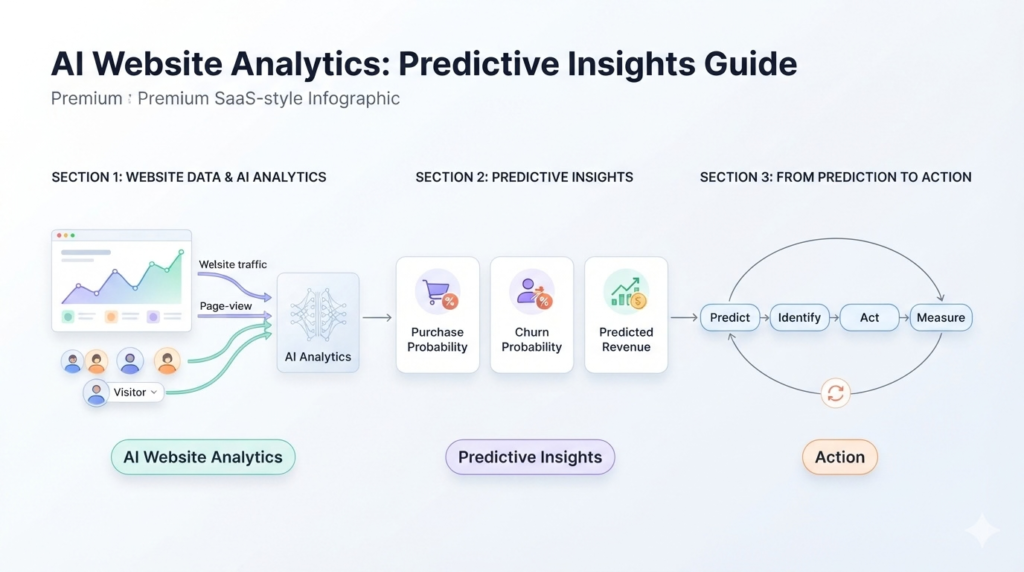
AI Website Analytics: Predictive Insights Guide
Key Takeaways
- GA4 already includes built-in AI website analytics, predicting purchase probability, churn probability, and expected revenue automatically.
- Google’s predictive metrics only activate once a property logs at least 1,000 positive and 1,000 negative samples in a rolling window, a threshold many small sites never hit.
- Roughly 58% of U.S. small businesses have now adopted some form of AI tool, according to the U.S. Chamber of Commerce.
- Third-party AI analytics tools exist specifically to fill the gap for lower-traffic sites that cannot unlock GA4’s native predictions.
- AI analytics work best as a decision-support layer, flagging where to look next, not as a replacement for actually interpreting the data.
AI Website Analytics: Predictive Insights Guide
Google quietly turned Analytics into something closer to a forecasting tool. AI website analytics inside GA4 now predicts which visitors are about to buy, which ones are about to disappear, and how much revenue to expect, all without a single line of custom code. We have set up predictive metrics for clients who had no idea the feature existed inside their own free GA4 account. The catch, which almost nobody mentions, is that it only works once your site hits a specific traffic threshold. This guide covers what AI website analytics actually does, what GA4 gives you for free, where it falls short for smaller sites, and where dedicated AI tools pick up the slack. In one sentence: AI website analytics uses machine learning to study past visitor behavior and predict what happens next, like who is likely to buy, who is likely to leave, and how much revenue to expect, so you can act before those outcomes happen instead of after.
What Is AI Website Analytics?
AI website analytics applies machine learning models to your existing traffic and behavior data, generating forward-looking predictions instead of just historical reports. It is the difference between seeing what happened last month and knowing what is likely to happen next week. AI analytics tools fall into two categories. Built-in options, like the predictive metrics inside Google Analytics 4, are free and already sitting in most business’s existing accounts. Dedicated AI-powered web analytics platforms go further, adding session recordings, heatmaps, and automated anomaly alerts on top of predictions.
GA4 Predictive Metrics: What Google Already Gives You for Free
GA4 predictive metrics are the most accessible form of predictive analytics for websites available today, since most small businesses already have GA4 installed.
| Metric | What It Predicts | Time Window |
|---|---|---|
| Purchase Probability | Chance an active user buys | Next 7 days |
| Churn Probability | Chance an active user does not return | Next 7 days |
| Predicted Revenue | Expected revenue from active users | Next 28 days |
Here is the part most guides skip. These predictive insights for website performance only activate once your property logs at least 1,000 positive and 1,000 negative samples, meaning 1,000 users who converted and 1,000 who did not, within the relevant window. Lower-traffic sites simply never meet that bar, and the predictions stay unavailable no matter how well the account is configured.
Churn Prediction and User Behavior Prediction for Websites
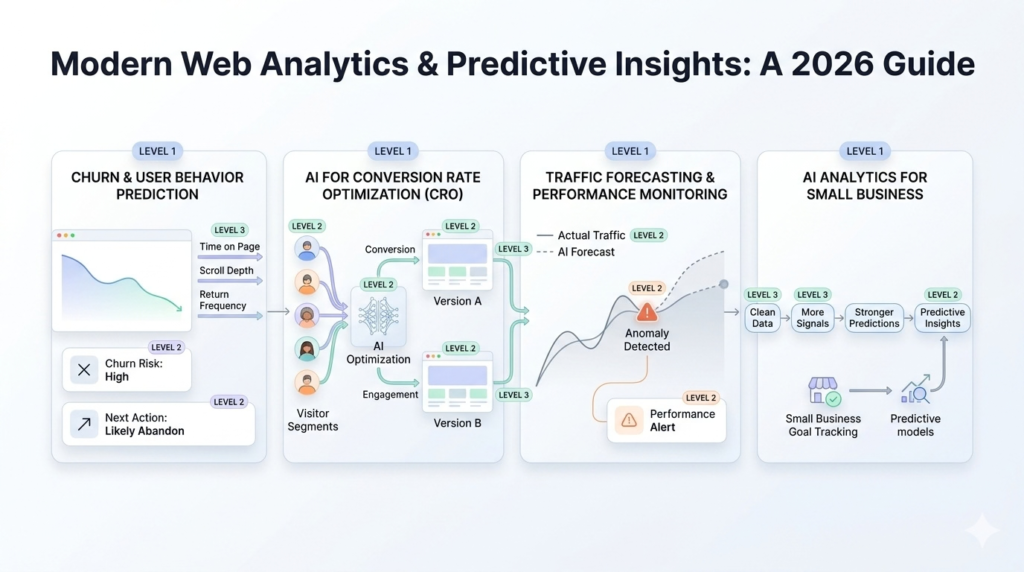
Churn prediction for websites flags visitors who are showing early signs of disengagement before they actually leave for good. Instead of noticing a customer is gone after the fact, the model flags declining engagement patterns while there is still time to act. User behavior prediction works from the same underlying idea. Machine learning website analytics tools study patterns like time on page, scroll depth, and return frequency to estimate what a specific visitor is likely to do next, whether that is converting, browsing further, or abandoning the session.
AI for Conversion Rate Optimization
AI for conversion rate optimization shifts CRO from broad, site-wide testing toward individual visitor-level predictions. Instead of testing one headline against another for everyone, AI models can identify which segment of visitors responds to which version. This matters most for sites running frequent A/B tests. Machine learning can shorten the time needed to find a statistically meaningful result, since it factors in more behavioral signals than a simple split test alone.
AI Traffic Forecasting and Performance Monitoring
AI traffic forecasting estimates future visitor volume based on historical patterns, seasonality, and recent trend shifts. This helps with everything from staffing decisions to ad budget planning, since it gives a databacked expectation instead of a guess. AI website performance monitoring goes a step further, using anomaly detection to flag unusual drops or spikes automatically. Rather than manually checking dashboards daily, an AI layer can alert you the moment traffic, conversions, or engagement deviate meaningfully from the expected pattern.
AI Analytics for Small Business: Is It Worth It Yet?
AI analytics for smallbusiness is becoming standard rather than exceptional. Roughly 58% of U.S. small businesses have adopted some form of AI tool, according to U.S. Chamber of Commerce data, and analytics is one of the more accessible entry points. That said, the honest answer depends on traffic volume. A site with a few hundred monthly visitors will not unlock GA4’s native predictions, no matter how well it is set up. For those businesses, the immediate value comes from cleaner data, better goal tracking, and simpler AI-powered insights panels rather than full predictive modeling. Once traffic and conversion volume grow, either through GA4 hitting its own thresholds or through a dedicated AI analytics platform built for lower-volume sites, predictive insights become genuinely actionable rather than theoretical.
Frequently Asked Questions
What is AI website analytics?
AI website analytics uses machine
learning to analyze visitor behavior and generate predictions, such as
who is likely to buy or leave, instead of only reporting on what already
happened.
How do GA4 predictive metrics work?
GA4 predictive metrics use
machine learning models trained on your site’s historical data to
estimate purchase probability, churn probability, and expected revenue,
activating automatically once your property meets Google’s minimum
data thresholds.
Why doesn't my small business site show GA4 predictive metrics?
Predictive metrics require at least 1,000 positive and 1,000 negative
samples within a 7 or 28 day window. Many small business sites simply
do not have enough traffic or conversion volume to meet that threshold
yet.
How does AI help with conversion rate optimization?
AI for
conversion rate optimization analyzes visitor-level behavior patterns to
identify which segments respond to which experience, often finding
meaningful results faster than traditional A/B testing alone.
Is AI analytics worth it for a small business with low traffic?
It
depends on volume. Lower-traffic sites may not qualify for GA4’s native
predictions, but they can still benefit from AI-powered insights panels,
anomaly detection, and simpler behavior tracking while traffic grows.
AI website analytics is not a future feature anymore, it is sitting inside most businesses’ existing GA4 account right now, waiting on enough data to activate. For sites that are not there yet, dedicated tools can fill the gap sooner. Either way, predictions are only useful if someone is actually acting on them. Reach out to getwebix to set up AI-powered analytics properly and turn those predictions into real decisions.
Related Posts
Local SEO for Service Businesses: Full Guide
Local SEO for Service Businesses: Full Guide Key Takeaways 46% of all Google searches carry local intent, and...
Read More
webshop
October 23, 2026
SSL Certificate and HTTPS: Why They Matter
SSL Certificate and HTTPS: Why They Matter Key Takeaways Starting with Chrome 154 in October 2026, Chrome will...
Read More
webshop
October 21, 2026
Shopify Migration: From WooCommerce or BigCommerce
Shopify Migration: From WooCommerce or BigCommerce Key Takeaways Most WooCommerce stores accumulate 20 to 60 active plugins by the...
Read More
webshop
October 19, 2026